When creating ZenPacks using zenpacklib, assigning modeler plugins to device classes will cause all the device class's modeler plugins to be replaced by the new modeler plugins assigned by the ZenPack. Obviously most of the time this is not the behaviour we want. What we really want is that the new modeler plugins are simply added to the device class's list of modeler plugins.
In a previous post I explained how we can customize the ZenPacks installation process to perform additional tasks. The way to append new modeler plugins to a device class follows this concept.
Let's assume that we have the OpenStack Infrastructure ZenPack installed in our Zenoss Core. This ZenPack adds some custom modeler plugins to the /Server/SSH/Linux/NovaHost device class. We want our custom ZenPack to add new modeler plugins to this device class without replacing the ones added by the OpenStack ZenPack.
This will be done upon installation (like in the previous post) inside the __init__.py file in the ZenPack top directory. This is how the code looks like:
There are some circumstances where we need to perform certain tasks in our ZenPack the moment it is installed. We can achieve this using Python by placing this logic inside the ZenPack's top directory's __init__.py file. When creating a fresh ZenPack using zenpacklib, this __init__.py file will contain the following contents:
from.importzenpacklibCFG=zenpacklib.load_yaml()
To add custom functionality that gets executed when the ZenPack is installed, we need to extend the install method of the ZenPack class. Below the original code, we can proceed to do so:
No other imports are necessary. Notice the last line of the install method, this is where the ZenPack gets installed.
For the purpuse of giving an example, Let's say that our ZenPack creates two new zProperties, one property to store an API key, and the other one to store a URL. Moreover let's say that we obtain these values from somewhere and we want to assign them automatically to the properties upon the installation of the ZenPack.
These two new properties are defined in zenpack.yaml:
Net-SNMP is a suite of tools used to implement SNMP (Simple Network Management Protocol). SNMP is a widely used protocol for monitoring the health and welfare of network equipment (eg. routers), computer equipment and even devices like UPSs. Net-SNMP includes tools with capabilities such as:
An extensible agent
An SNMP library
Tools to request or set information from SNMP agents
Tools to generate and handle SNMP traps
A version of the unix ‘netstat’ command using SNMP
A graphical Perl/Tk/SNMP based mib browser
How SNMP Works
SNMP allows a management station to treat its network as a distributed database of health and configuration information. SNMP contains a small set of operations:
GET: Retrieve data from a network node
GETNEXT: Retrieve the next element from a network node
SET: Send configuration or control commands to a network node
TRAP: A network node can send a notification to the management station
INFORM: An acknowledged trap (network nodes can try and send it again if no acknowledgement is received)
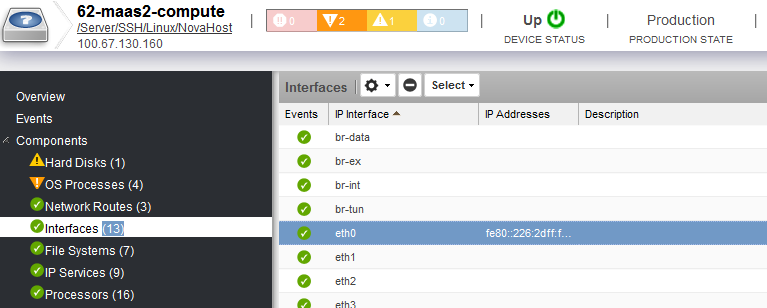
When testing the monitoring of the OpenStack compute node devices in Zenoss (using OpenStack Infrastructure ZenPack), I noticed that I could not get any graphs for the network interfaces of the device, although we could still get and model all the available interfaces:
This was indeed strange because I could perfectly get the graphs for other devices. After a lot of head scratching and prying around the code and interface, I finally found the reason, which I explain below.
When starting to learn JavaScript, there are a few details and gotchas that are always important to remember. Memorizing and understanding these concepts will make you a better and faster JavaScript programmer overall and it is why I am listing a few of these concepts (which are best learned at the beginner level) in this post.
The Global Object
The global scope is the space in which global variables live and it can also be approached as an object. Each global variable is present as a property of this object. In browsers, the global scope object is stored in the window variable: