The OpenStack Oslo library provides a set of Python libraries containing code shared by different OpenStack projects. This helps the many different OpenStack projects to follow a certain standard and convention when being developed.
In this post I want to go over oslo_config. This library helps with parsing of options found in configuration files or command line arguments.
Understanding Options
An option is defined using the Opt class or one of its sub-classes, from the cfg module:
fromoslo_configimportcfgcommon_opts=[cfg.StrOpt('bind_host',default='0.0.0.0',help='IP address to listen on.'),cfg.Opt('bind_port',type=PortType,default=9292,help='Port number to listen on.')]
In the example above we can see that we are using Opt and StrOpt, one of its sub-classes. You might notice that the second option's constructor has a type=PortType argument. This argument is a callable object that takes a string and either returns a value of that particular type, or raises ValueError if the value cannot be converted. The different types available can be found in the types module:
In a previous post I talked about managing Debian package dependencies. However I did not go into detail about the structure the versioning of packages must have.
To recap, let's see how we can specify a specific package version of a dependency that our package needs:
Depends: erlang (>= 1.2)
In the example above, the required version for erlang is simply 1.2 or greater. A package's version format however, can be a bit more complex than this.
Version Format and Components
The official format of a Debian package's version is:
[epoch:]upstream_version[-debian_revision]
Let's go into detail about each of the components in that format.
Continuing with my study of the Ceilometer pipeline, this post now covers Ceilometer publishers. Publishers are components that make it possible to save the data into a persistent storage through the message bus, or to send it to one or more external consumers.
Publishers are specified in the publishers section for each pipeline that is defined in the pipeline.yaml and the event_pipeline.yaml files.
Many different publishers are available. The following are the most common and important publishers:
Gnocchi
Gnocchi is a multi-tenant timeseries, metrics and resources database. It provides an HTTP REST interface to create and manipulate the data. It is designed to store metrics at a very large scale while providing access to metrics and resources information and history.
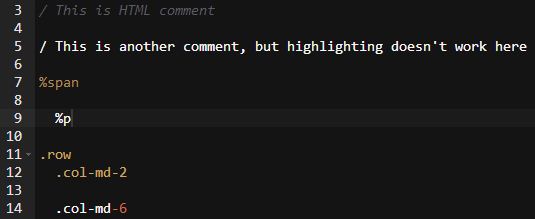
Ace is a great web text editor and the default editor for Cloud 9 IDE. I have been using it for many years without any complaints at all. However I was not very satisfied with the HAML syntax highlighting, which seemed to have some problems caused by indentation when highlighting some tokens. Additionally, it didn't support correct highlighting of some HAML stuff such as HAML comments (which begin with -#) or block comments.
This is how Ace's HAML syntax highlighting issues look like:
I proceeded to study Ace's logic for syntax highlighting. It consists basically on a lexer that reads the input through different regular expressions and proceeds to different stages depending on the regular expression caught. Basically, a state machine. The source where this happens is found in lib/ace/mode/haml_highlight_rules.js
Defining States
A few states have to be defined to represent where the lexer currently “stands” in regards to the code. For example, entering a multi-block comment could represent entering a new state, since everything parsed in this state would belong to this block comment until the block ends, this will also mean another change of state.
In Ace, all syntax highlighting lexers must begin with a start state. From this state we can switch to other defined states. The example below shows how we begin from the start state and can jump to a comment block state when the code matches a regular expression that represents this:
Notice that we define 2 different comment types, since HAML supports HAML (not rendered in HTML) and HTML (rendered in HTML) comments. Both of these different regular expressions will make the lexer parse them as comment.blocktokens, and will also make the lexer jump to a comment state, denoted by the next keyword.